In an increasingly digital world, website security has become a top priority for businesses and individuals alike. If you’re using WordPress for your website, you may already be aware of the potential vulnerabilities it can have. That’s where Wordfence comes in – the ultimate tool for protecting your WordPress site.
Product Name
Wordfence
In this comprehensive guide, we’ll show you exactly how to secure your website with Wordfence. Whether you’re a beginner or an experienced WordPress user, our step-by-step instructions will walk you through the process of installing and configuring Wordfence to safeguard your site from hackers, malware, and other threats.
We’ll cover everything from setting up a strong password and two-factor authentication to identifying and blocking suspicious IP addresses. We’ll also explore the advanced features of Wordfence, such as its firewall and malware scanner, and how to optimize them for maximum protection.
Don’t leave your WordPress site vulnerable to attacks – with the help of Wordfence, you can have peace of mind knowing that your website is secure. So, let’s dive in and learn how to fortify your WordPress site with the ultimate security plugin – Wordfence.

What it does for your website
Understanding Wordfence Security Plugin
Wordfence is a leading security plugin specifically designed to enhance the security of WordPress websites. With over millions of active installations, Wordfence is a trusted solution for website owners looking to protect their online assets effectively. The plugin offers a range of security features, including firewall protection, malware scanning, login security, and real-time threat defense. By understanding the capabilities of Wordfence, you can empower yourself to combat cyber threats and secure your website against potential vulnerabilities.
One of the key strengths of Wordfence is its real-time threat defense feature, which continuously monitors your website for suspicious activity and blocks malicious traffic before it can reach your site. This proactive approach to security helps prevent potential attacks and ensures that your website remains secure at all times. Additionally, Wordfence’s malware scanner scans your website files for any malicious code or malware infections, allowing you to identify and remove security threats promptly. By leveraging these advanced security features, you can stay one step ahead of cybercriminals and protect your WordPress site effectively.
Furthermore, Wordfence offers robust login security options, such as two-factor authentication and login page CAPTCHA, to prevent unauthorized access to your website. These additional layers of security help fortify your site against brute force attacks and unauthorized login attempts, enhancing the overall security posture of your WordPress website. With its comprehensive security capabilities and user-friendly interface, Wordfence is a powerful tool that empowers website owners to take control of their online security and protect their valuable digital assets.

Ease of Use
Installation and Setup of Wordfence
Installing and setting up Wordfence on your WordPress website is a straightforward process that can be completed in a few simple steps. To begin, log in to your WordPress dashboard and navigate to the “Plugins” section. Click on “Add New” and search for “Wordfence Security” in the search bar. Once you locate the plugin, click “Install Now” and then activate it to start using Wordfence on your site.
After activation, you will be prompted to set up Wordfence by creating an account or logging in if you already have one. This step is essential for accessing Wordfence’s premium features and receiving security alerts and notifications. Once you have completed the account setup, you can configure Wordfence settings according to your preferences. Customize options such as firewall rules, malware scan schedules, and login security to tailor Wordfence to your website’s specific needs.
Additionally, take the time to review Wordfence’s documentation and knowledge base to familiarize yourself with the plugin’s features and functionalities. By understanding how Wordfence works and how to optimize its settings, you can maximize the security benefits it provides for your WordPress site. Remember to keep Wordfence updated regularly to ensure that you have the latest security patches and features to protect your website effectively. With proper installation and setup, Wordfence can serve as a powerful ally in safeguarding your WordPress site from cyber threats and attacks.
Security is Key
Wordfence Security Features and Options
Wordfence offers a wide range of security features and options to help you fortify your WordPress website against cyber threats. One of the key features of Wordfence is its firewall protection, which acts as a barrier between your site and potential attackers. The firewall monitors incoming traffic and blocks suspicious requests, protecting your website from malicious actors and unauthorized access attempts. By configuring firewall rules and settings, you can customize the level of protection provided by Wordfence to suit your specific security requirements.
In addition to firewall protection, Wordfence includes a powerful malware scanner that scans your website files for any signs of malicious code or infections. The scanner checks for known malware signatures and suspicious patterns, allowing you to detect and remove security threats before they can harm your site. With regular malware scans and automatic threat removal, Wordfence helps you maintain a clean and secure website environment for your visitors.
Another essential security feature offered by Wordfence is login security, which helps prevent unauthorized access to your WordPress site. By enabling options such as two-factor authentication, login page CAPTCHA, and password strength requirements, you can enhance the security of your website’s login process and protect against brute force attacks. These additional security measures add an extra layer of protection to your site and reduce the risk of unauthorized access by malicious actors.
Furthermore, Wordfence provides real-time threat defense capabilities that monitor your website for suspicious activity and block malicious traffic in real-time. This proactive approach to security helps prevent potential attacks and ensures that your website remains secure at all times. By leveraging Wordfence’s advanced security features and options, you can strengthen your WordPress site’s defenses and protect your online assets from cyber threats and intrusions.
Does it Stand Out
Configuring Wordfence Firewall Rules
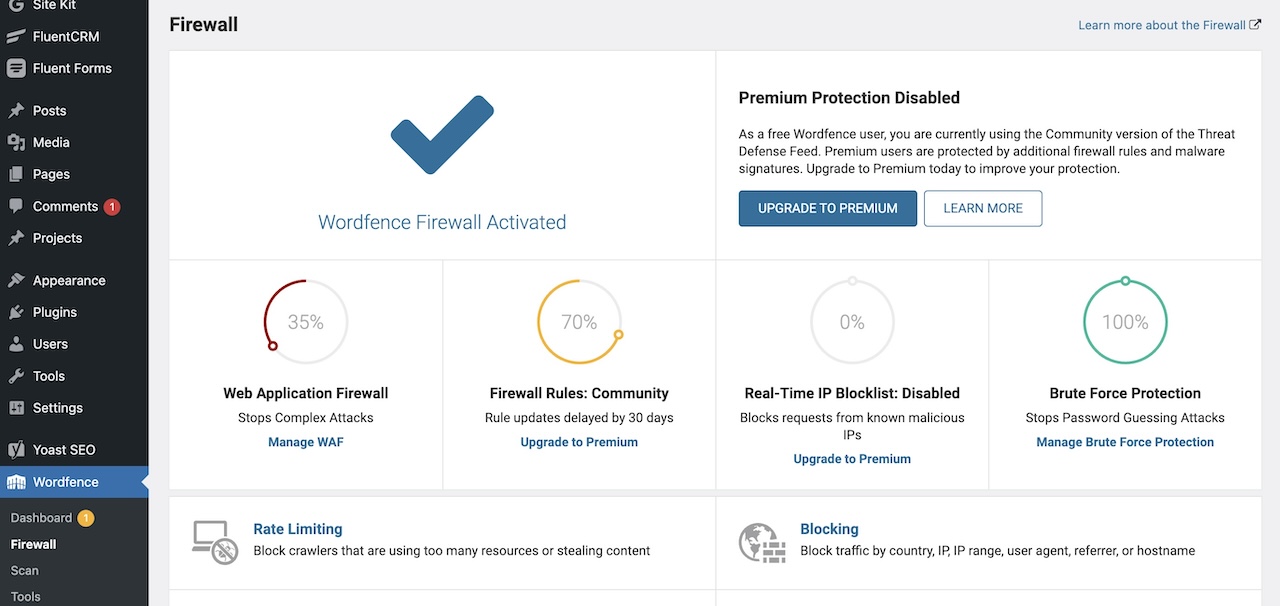
Configuring firewall rules in Wordfence is a critical step in optimizing your website’s security and protecting it against cyber threats. By customizing firewall settings and rules, you can enhance the effectiveness of Wordfence’s firewall protection and tailor it to your specific security needs. To configure firewall rules, navigate to the Wordfence settings in your WordPress dashboard and click on the “Firewall” tab. Here, you can access a range of options and settings to fine-tune your firewall configuration.
One essential aspect of configuring firewall rules is specifying the traffic that you want to block or allow on your website. You can create custom firewall rules based on IP addresses, user agents, or specific patterns to control the flow of incoming traffic and block malicious requests. By defining these rules, you can prevent potential website attacks and unauthorized access attempts, strengthening your website’s security posture. Additionally, you can enable advanced firewall settings such as country blocking and rate limiting to further enhance your site’s protection against cyber threats.
Furthermore, regularly monitoring and reviewing your firewall rules is crucial to ensure that your website remains secure and protected. By analyzing firewall logs and security alerts, you can identify any suspicious activity or potential security threats and take proactive measures to mitigate them. It’s important to stay vigilant and proactive in managing your firewall rules to effectively safeguard your website against cyber attacks and intrusions. With a well-configured firewall and tailored rules, you can fortify your WordPress site’s defenses and create a secure online environment for your visitors.

Malware Scanning and Protection
Wordfence Scan and Malware Removal
Regular scanning and malware removal are essential components of maintaining a secure WordPress website. Wordfence offers a powerful malware scanner that helps you identify and remove any malicious code or infections present on your site. By running regular scans, you can detect security threats early and take prompt action to eliminate them, ensuring that your website remains clean and secure for visitors.. To initiate a malware scan in Wordfence, navigate to the “Scan” tab in the plugin settings and click on “Start New Scan.”
The malware scanner in Wordfence performs a comprehensive check of your website files, looking for known malware signatures, suspicious patterns, and potential security vulnerabilities. If the scanner detects any malicious code or infections, it will provide you with detailed reports and recommendations for removing the threats. You can then take appropriate action to clean your website and secure it against future attacks. Regular malware scans are crucial for maintaining a healthy website environment and protecting your online assets from cyber threats.
In addition to malware scanning, Wordfence offers automated threat removal capabilities that can help you quickly eliminate security risks from your website. By automatic threat removal in the plugin settings, you can have Wordfence take immediate action against detected threats, removing malicious code and infections without manual intervention. This proactive approach to security helps you keep your website clean and secure, reducing the risk of data breaches and compromise. With regular scans and automated threat removal, Wordfence empowers you to maintain a secure and reliable WordPress site for your visitors.

FAQ’s
Advanced Security Measures with Wordfence
In addition to its core security features, Wordfence offers advanced security measures that can further enhance the protection of your WordPress website. One such measure is two-factor authentication, a security method that requires users to provide two forms of identification to access their accounts. By enabling two-factor authentication in Wordfence, you can add an extra layer of security to your website’s login process and prevent unauthorized access by malicious actors.
Another advanced security feature offered by Wordfence is the ability to block suspicious IP addresses and malicious traffic in real-time. By leveraging Wordfence’s real-time threat defense capabilities, you can monitor incoming traffic to your website and block any suspicious requests or activity before it can harm your site. This proactive approach to security helps prevent potential attacks and ensures that your website remains secure at all times. Additionally, Wordfence provides detailed security logs and reports that allow you to monitor and analyze security events on your website, helping you identify and address potential security threats promptly.
Furthermore, Wordfence offers security options such as live traffic monitoring, which allows you to view real-time traffic to your website and identify any suspicious activity. By monitoring live traffic, you can proactively detect and block potential threats before they can compromise your site’s security. Additionally, Wordfence provides detailed security alerts and notifications that keep you informed about security events on your website, allowing you to take immediate action to protect your site. With its advanced security measures and proactive defense capabilities, Wordfence empowers you to fortify your WordPress site’s defenses and safeguard your online assets from cyber threats.

Guide
Best Practices for Website Security
While leveraging security plugins like Wordfence is essential for protecting your WordPress website, implementing best practices for website security is equally important. By following industry-recommended guidelines and adopting proactive security measures, you can create a robust defense against cyber threats and safeguard your online presence effectively. One of the fundamental best practices for website security is keeping your software, themes, and plugins up to date. Regularly updating your WordPress installation and plugins helps patch security vulnerabilities and reduces the risk of exploitation by attackers.
Additionally, using strong and unique passwords for your website accounts is crucial for preventing unauthorized access and data breaches. Avoid using common passwords or reusing passwords across multiple accounts, as this can compromise the security of your website. Implementing two-factor authentication for login access adds an extra layer of security to your website and helps protect against brute force attacks. By requiring users to provide a second form of identification, such as a code sent to their mobile device, you can enhance the security of your website’s login process.
Regularly backing up your website data is another essential best practice for website security. In the event of a security breach or data loss, having up-to-date backups allows you to restore your website quickly and minimize downtime. Consider using automated backup solutions or cloud storage services to ensure that your website data is securely backed up at regular intervals. Furthermore, monitoring your website for suspicious activity and security threats is crucial for detecting and mitigating potential risks proactively. By using security plugins like Wordfence to scan for malware and monitor traffic, you can stay informed about security events on your website and take immediate action to protect your site.
Educating yourself and your team about cybersecurity best practices and staying informed about the latest security threats and trends is essential for maintaining a secure website. By staying vigilant and proactive in managing your website’s security, you can create a safe online environment for your visitors and protect your digital assets from cyber threats. Implementing a comprehensive security strategy that combines security plugins, best practices, and proactive measures helps fortify your WordPress website against potential vulnerabilities and attacks, ensuring a secure browsing experience for your audience.

Conclusion
Conclusion and Final Thoughts
Securing your WordPress website with Wordfence is a crucial step in protecting your online assets and ensuring a safe browsing experience for your visitors. By understanding the common threats to WordPress websites, implementing robust security measures, and leveraging the advanced features of Wordfence, you can fortify your website against cyber threats and intrusions effectively. From installing and setting up Wordfence to configuring firewall rules, performing malware scans, and implementing advanced security measures, this guide has provided you with a comprehensive overview of how to secure your WordPress site with the ultimate security plugin.
As you navigate the ever-evolving landscape of website security, remember to stay informed about the latest security trends and threats to ensure that your website remains protected. Regularly updating your security plugins, monitoring your website for suspicious activity, and following best practices for website security are essential steps in maintaining a secure online presence. By taking a proactive approach to security and investing in robust security solutions like Wordfence, you can create a strong defense against cyber threats and safeguard your WordPress website from potential vulnerabilities.
In conclusion, protecting your WordPress website with Wordfence is an investment in the security and integrity of your online presence. By implementing the best practices outlined in this guide and leveraging the powerful features of Wordfence, you can fortify your website against cyber threats and create a safe environment for your visitors. Secure your WordPress site with Wordfence today and enjoy peace of mind knowing that your valuable digital assets are protected against malicious actors and security risks. Stay vigilant, stay informed, and stay secure in the digital world with Wordfence as your trusted security partner.
Details
Take Your Email Marketing To The Next Level
Challenge
Increase your reach.
Solution
Install Fluent CRM